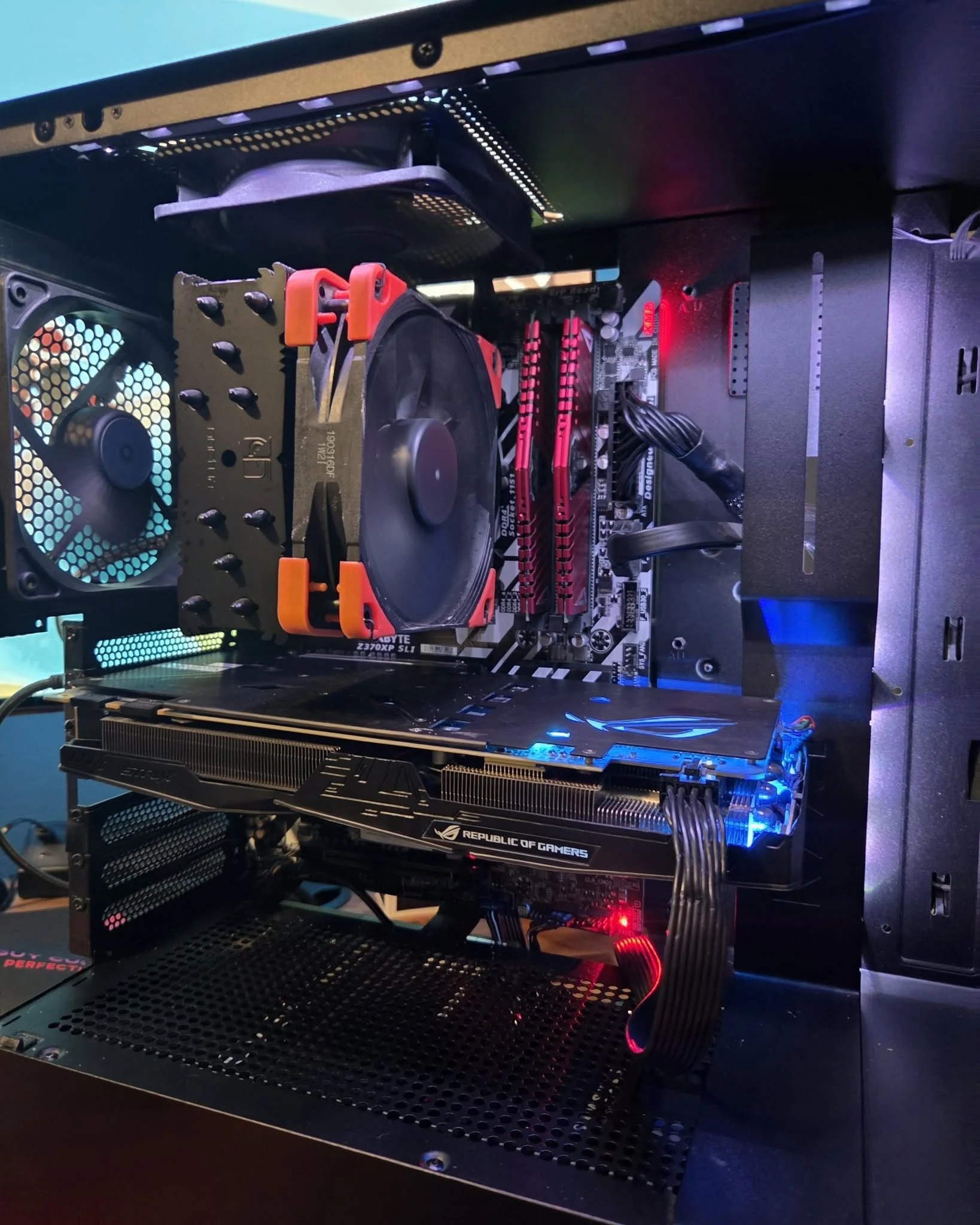
Ember Stack is a dark, air-cooled gaming build centered on an Intel Core i5-9600K and an ASUS GeForce GTX 1070 8 GB. Four red DDR4 memory modules and the large tower-style CPU cooler give the interior a strong red-and-black character, while the rear RGB fan adds a restrained burst of color without hiding the hardware.
Documented Build Details
ProcessorIntel Core i5-9600K
Memory16 GB DDR4
GraphicsASUS GeForce GTX 1070 8 GB
Storage500 GB Samsung 860 EVO SSD + 500 GB HDD
CPU CoolingTower-style air cooler; exact model not documented
Accuracy note: The supplied handwritten build note documents the i5-9600K, 16 GB DDR4, 500 GB Samsung 860 EVO, 500 GB HDD, and ASUS GTX 1070 8 GB. The exact motherboard, power supply, chassis model, and CPU-cooler model are intentionally not guessed.
Build character: Four red memory modules, a substantial tower cooler, a black chassis, and a small amount of RGB lighting give Ember Stack a purposeful older-school performance look built around visible hardware rather than decorative excess.
The story behind the build
More About This PC
A classic look, customized for today's games.
A flash of red through the side panel. A substantial air cooler at the center. Ember Stack has the kind of classic gaming-PC character you notice before it even powers on. The red-and-black combination feels deliberate and bold, with real components—not decorative clutter—doing the talking.
Inside is a six-core Intel i5-9600K paired with a GTX 1070 8 GB, 16 GB DDR4 and a practical mix of SSD and hard-drive storage. It is a snapshot of a capable earlier-generation gaming setup, and its strongest appeal today is how much personality Chris gave to straightforward hardware.
Love the attitude but want to dive into newer games? Chris can carry this exact red-and-black energy into a fresh custom build, then pick a modern CPU, graphics card and storage around what you actually play. You get the look that caught your eye and a performance target that makes sense for you.
1080p esports, older AAA releases and light games are realistic targets. Recent demanding games may require low settings or may fall outside the system's practical capabilities.
Think competitive matches, classic PC adventures and lighter games at 1080p rather than trying to max out every new blockbuster. The advantage of custom building is knowing where an upgrade will make the experience noticeably better.
Everyday & creative
Everyday productivity, media, school or office applications and light creative projects.
It also makes a practical daily computer for documents, web work and light design. If you create big layered artwork or edit lots of video, Chris can recommend a newer graphics card and more memory.
The GTX 1070 has no hardware ray tracing or DLSS. These are hardware-based expectations, not measured FPS benchmarks. Operating system, required software, drivers and games must be separately installed and configured.
Gaming Performance
We chose 10 widely played PC games to show what this build can handle—from fast competitive matches to demanding graphics. These are examples, not the only games it can play. Open a title to compare visual quality and estimated FPS.
01ARC Raiders1080p · Low
Best visuals1080p · Low~30–55 FPS
Best speed1080p · Low + resolution scale~40–65 FPS
02Counter-Strike 21080p · High
Best visuals1080p · High~90–145 FPS
Best speed1080p · Competitive~135–200 FPS
03Marvel Rivals1080p · Low
Best visuals1080p · Low~30–50 FPS
Best speed1080p · Low + resolution scale~40–60 FPS
04PUBG: BATTLEGROUNDS1080p · Medium
Best visuals1080p · Medium~45–75 FPS
Best speed1080p · Low~60–95 FPS
View All 10 GamesShow Fewer Games
05Dota 21080p · High
Best visuals1080p · High~80–140 FPS
Best speed1080p · Medium~125–190 FPS
06Overwatch 21080p · Medium
Best visuals1080p · Medium~75–125 FPS
Best speed1080p · Low~110–170 FPS
07Apex Legends1080p · Medium
Best visuals1080p · Medium~65–105 FPS
Best speed1080p · Low~90–145 FPS
08Rainbow Six Siege1080p · High
Best visuals1080p · High~75–130 FPS
Best speed1080p · Low~120–185 FPS
09Rust1080p · Low
Best visuals1080p · Low~35–60 FPS
Best speed1080p · Low + resolution scale~45–75 FPS
10Valheim1080p · Medium
Best visuals1080p · Medium~50–85 FPS
Best speed1080p · Low~70–105 FPS
Broad estimated average FPS ranges based on published GPU performance trends, not benchmarks of Chris's actual completed PC. Individual game results depend on the CPU, drivers, patches, scene complexity and server. Ray tracing and frame generation are OFF unless a mode says otherwise. Upscaling is only assumed when explicitly listed. Competitive settings prioritize speed instead of maximum detail. Independent GPU comparison · Popular game selection.
Creative Work: Capabilities & Limits
What this hardware handles and where it reaches its limits.
Adobe Photoshop
Handles: Small PSD edits, thumbnails, photo retouching
Limitation: 16 GB RAM limits heavy layering; some newer GPU features may be unavailable
Adobe Illustrator
Handles: Logos, flyers, vector illustrations
Limitation: Very large complex artboards can be slower on the i5-9600K
Lightroom Classic
Handles: Small RAW catalogs and simple batches
Limitation: 16 GB RAM and older CPU slow mass exports
DaVinci Resolve
Handles: Simple 1080p cuts and light color correction
Limitation: Heavy Fusion effects and 4K timelines are poor fits
Adobe Premiere Pro
Handles: Short 1080p projects and simple transitions
Limitation: 16 GB RAM and GTX 1070 hold back intensive 4K work
Blender
Handles: Basic models and simple scenes
Limitation: Large scenes and GPU renders are limited by GTX 1070 hardware
Hardware-based guidance, not measured editing results. Software, compatible drivers and licenses are required.
Inspired by Ember Stack?
Tell us what you need from your next PC and we will build around your performance goals, style, and budget.
CPU CoolingTower-style air cooler; exact model not documented
Cookie Preferences
We use cookies and similar technologies for essential site functions and analytics. Choose Accept, Deny, or review your preferences. You can change your choice later.
Functional
Always active
The technical storage or access is strictly necessary for the legitimate purpose of enabling the use of a specific service explicitly requested by the subscriber or user, or for the sole purpose of carrying out the transmission of a communication over an electronic communications network.
Preferences
The technical storage or access is necessary for the legitimate purpose of storing preferences that are not requested by the subscriber or user.
Statistics
The technical storage or access that is used exclusively for statistical purposes.The technical storage or access that is used exclusively for anonymous statistical purposes. Without a subpoena, voluntary compliance on the part of your Internet Service Provider, or additional records from a third party, information stored or retrieved for this purpose alone cannot usually be used to identify you.
Marketing
The technical storage or access is required to create user profiles to send advertising, or to track the user on a website or across several websites for similar marketing purposes.